Subsections of for system integrators
smtp without authentication

Sometimes old softwares or very simple applications
do not allow to issue a secure authentication as RealSender requires.
The solution is to provide an open a port to go through the smtp server,
checking only the connection’s ip address and the sender’s email address.
In this way you’ll be able to send your email messages without authentication,
but you will always be allowed to authenticate whenever possible.
RealSender partners and large organizations
can independently update the list of authorized IPs.
Request a free trial
smtp with dedicated hostname

A corporate smtp hostname is used in multiple applications settings.
Changing it is an error-prone activity that takes time.
RealSender allows you to define your subdomain, such as:
We’ll take care of everything, including SSL certificates
that are required for secure smtp authentication.
This setup will give you complete peace of mind,
knowing that the smtp hostname is under your control.
Your IT staff won’t have to remember where it’s configured
since it will no longer be necessary to change it.
Please note: the special configuration required
involves an additional annual cost
which will be specified during the offer phase.
Request a free trial
sending via api
Topics in this area:
server address, mandatory parameters, JSON answers
charset, content-type, optional parameters, JSON responses
php and curl examples
php and curl examples with attachments
Subsections of sending via api
api overview
RealSender lets you send email messages via API (Application Programming Interface).
In this way you can dispatch the emails directly from your application, without passing through smtp (Simple Mail Transfer Protocol). We currently support POST requests only.
Server address:
https://rsXXX-api.realsender.com/mail/send
Required/mandatory parameters:
| Parameter |
Description |
| apiuser |
authentication user name |
| apipass |
authentication password |
| from |
sender email address |
| to |
recipient email address |
| subject |
subject of the email |
| text |
email body in plain text |
| html |
email body in HTML format |
If everything is ok, the message will be sent and you will receive a positive JSON answer:
{"success":true}
In case of errors you will get something like this:
{"success":false,"errorMsgs":["Please provide the 'subject' value."]}
API Details
api details
The contents must be sent using the UTF-8 international charset.
To test it, add “€uro” in your subject and submit it. If the charset is wrong, you will receive this JSON warning:
{"success":false,"errorMsgs":["The 'subject' value is not correctly encoded. It must be UTF-8 encoded."]}
Depending on whether you have filled in one or both the fields “text” and “html”, the messages will be sent using one of these “Content-Type”:
| Parameter |
Description |
| text |
text/plain (text only) |
| html |
text/html (html only) |
| text+html |
multipart/alternative (both text and html)
email client settings will decide which part is displayed |
Not required/optional parameters:
| Parameter |
Description |
| fromname |
sender description |
| toname |
recipient description |
| replyto |
email address that will receive the replies |
| returnpath |
email address that will receive the bounced mails
it must be present among the RealSender’s authorized senders |
| cc |
carbon copy email address |
| ccname |
carbon copy description |
| bcc |
blind carbon copy email address |
| bccname |
blind carbon copy description |
| attach |
file(s) to be attached - can be present multiple times in the form - 3MB max weight
the file contents must be part of the multipart HTTP POST
enctype=“multipart/form-data” is required for INPUT TYPE=FILE |
To, cc and bcc values can contain a single email address or a comma separated list of email addresses.
!! Within RealSender the total number of recipients for each piece of email is limited to 25 (it can be increased up to 100).
The server’s responses are in JSON (JavaScript Object Notation) format:
| Description |
Response |
| email sent |
{"success":true} |
| email NOT sent |
{"success":false,"errorMsgs":["..."]} |
API Examples
api examples
POST request
CURL-less method with PHP
<?php
$url = 'https://rsXXX-api.realsender.com/mail/send';
$data = array('apiuser' => 'the one we provided you', 'apipass' => 'the one we provided you', 'from' => 'sender@example.com', 'to' => 'recipient@example.com', 'subject' => 'subject of the message', 'text' => 'email body in plain text', 'html' => 'email body in HTML format');

// use key 'http' even if you send the request to https://...
$options = array(
    'http' => array(
        'header'  => "Content-type: application/x-www-form-urlencoded\r\n",
        'method'  => 'POST',
        'content' => http_build_query($data),
    ),
);
$context  = stream_context_create($options);
$result = file_get_contents($url, false, $context);

var_dump($result);
?>
POST request
CURL method
curl -d 'apiuser=the one we provided you&apipass=the one we provided you&from=sender@example.com&to=recipient@example.com&subject=subject of the message&text=email body in plain text&html=email body in HTML format'https://rsXXX-api.realsender.com/mail/send
API Examples with attachments
api examples with attachments
POST request with attachments (max 5: attach1, attach2, …)
CURL-less method with PHP
<?php
require_once 'HTTP/Request2.php';

$config = array('use_brackets' => false,
               );

$request = new HTTP_Request2('https://rsXXX-api.realsender.com/mail/send',
                             HTTP_Request2::METHOD_POST,
                             $config);

$data = array('apiuser' => 'the one we provided you',
              'apipass' => 'the one we provided you',
              'from' => 'sender@example.com',
              'to' => 'recipient@example.com',
              'subject' => 'subject of the message',
              'text' => 'email body in plain text',
              'html' => 'email body in HTML format');
foreach ($data as $k => $d) {
    $request->addPostParameter($k, $d);
};
$request->addUpload('attach1', './sample.pdf', 'sample.pdf', 'application/pdf');
$request->addUpload('attach2', './sample.txt', 'sample.txt', 'text/plain');

$result  = $request->send();
var_dump($result);
?>
POST request with attachments
CURL method
curl -F 'apiuser=the one we provided you' \
      -F 'apipass=the one we provided you' \
      -F 'from=sender@example.com' \
      -F 'to=recipient@example.com' \
      -F 'subject=subject of the message' \
      -F 'text=email body in plain text' \
      -F 'html=email body in HTML format' \
      -F 'attach=@sample.pdf;type=application/pdf' \
      -F 'attach=@sample.txt;type=text/plain' \
      https://rsXXX-api.realsender.com/mail/send
sending via http request
Topics in this area:
script address, mandatory parameters, hidden and non-hidden fields
not required / optional parameters, hidden and non-hidden fields
simple html web form example
sms forwarding to http configuration example using Teltonika routers
Subsections of sending via http request
overview
RealSender lets you easily submit http requests, such as web forms contents, via email messages.
In this way you can receive the results of your feedback forms directly in your mailbox.
There’s no need of any special configuration on your side.
The forms can be published in any html webpage or added directly within your email messages.
Script address:
<form action="https://rsXXX.realsender.com/script/form.pl" method="post" accept-charset="utf-8">
Required/mandatory parameters (hidden fields):
| Parameter |
Description |
| recipient |
the email address or the “alias” to which the form submission will be sent
for security reasons, the “real” address should be configured at sever level |
| required |
this is a list of fields that the user must fill in before they submit the form
we suggest to check the “email” field only (content and syntax are verified)
additional checks are usually done via javascript, we can provide examples |
| redirect |
the user will be redirected to this URL after a successful form submission |
| missing_fields_redirect |
the user will be redirected here if any of the ‘required’ fields are left blank |
Required/mandatory parameters (non-hidden fields):
| Parameter |
Description |
| email |
it will become the sender’s email address of the message |
if the email address
is correct |
the data will be sent to the configured recipient
the user will be redirected to the “redirect” URL |
if the email address
is missing or syntatically wrong |
no mail will be sent
the user will be redirected to the “missing_fields_redirect” URL |
HTTP REQUEST details
details
Not required/optional parameters (hidden fields):
| Parameter |
Description |
| subject |
the subject line for the email |
| env_report |
a list of the user’s environment variables that should be included in the email
useful for recording things like the IP address of the user, example:
value=“REMOTE_HOST,REMOTE_ADDR,HTTP_USER_AGENT” |
| print_blank_fields |
if this is set to “1” then fields left blank will be included in the email |
Not required/optional parameters (non-hidden fields):
| Parameter |
Description |
| realname |
the user’s full name, it will become part of the sender’s email address |
| any_other_field |
you can add as many fields you need, no setup is required at server level |
The encoding that will be used for the form submission is the UTF-8 international charset.
To test it, add “€uro” in any of your fields, submit the form and check the email message you’ll receive.
WEB FORM example
This is a simple html web form example
with two optional parameters: “realname” and “notes”
<form action="https://rsXXX.realsender.com/script/form.pl" method="post" accept-charset="utf-8">
    <input type="hidden" name="recipient" value="email_address-or-alias" />
    <input type="hidden" name="required" value="email" />
    <input type="hidden" name="redirect" value="/form/thankyou.html" />
    <input type="hidden" name="missing_fields_redirect" value="/form/error.html" />
        Name:<br />
        <input name="realname" /><br />
        Email:<br />
        <input name="email" /><br />
        Notes:<br />
        <textarea cols="40" rows="2" name="notes"></textarea><br />
        <input type="submit" />
</form>
The “redirect” and “missing_fields_redirect” landing pages can reside on your server.
You can add as many fields you need, no setup is required at server level.
SMS to HTTP example
sms to http example
To receive SMS messages directly in your mailbox
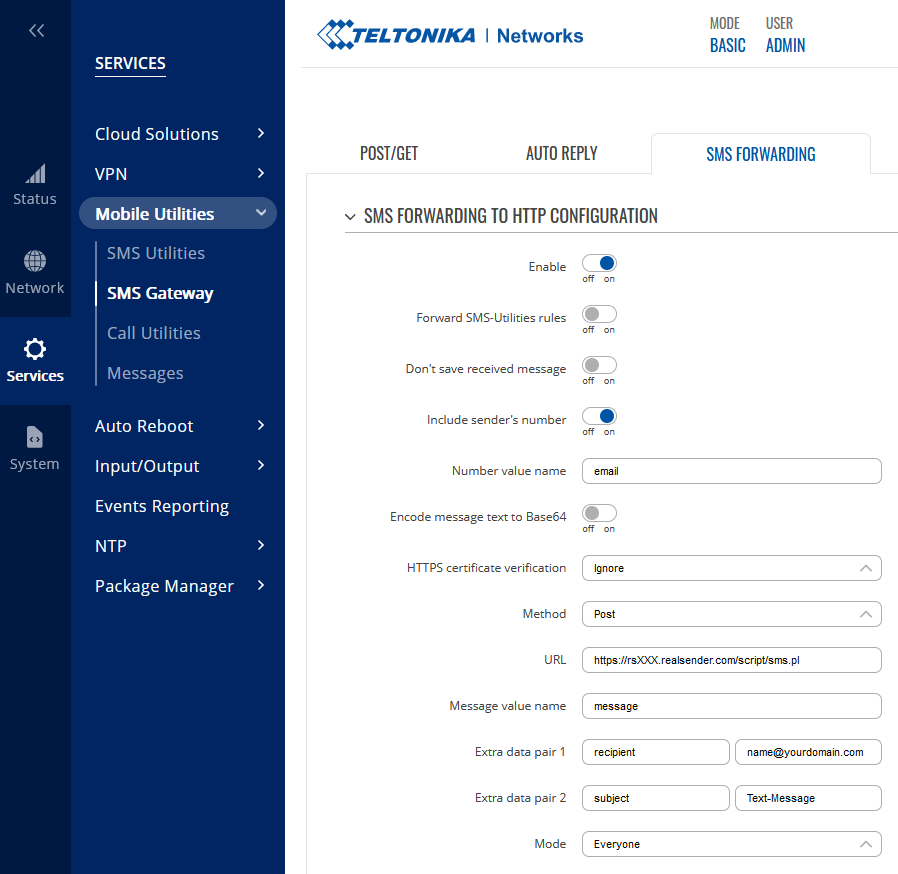
Teltonika routers offer the “SMS Forwarding To HTTP Configuration” option.
You can find it within the Teltonika WebUI: Services > Mobile Utilities > SMS Gateway.
!! The recipient’s domain (yourdomain.com) must be pre-authorized by RealSender !!
Number value name: email

Method: Post
URL:    https://rsXXX.realsender.com/script/sms.pl

Message value name: message
Extra data pair 1:  recipient | name@yourdomain.com
Extra data pair 2:  subject   | Text-Message
Option 1 - using MOBILE DATA
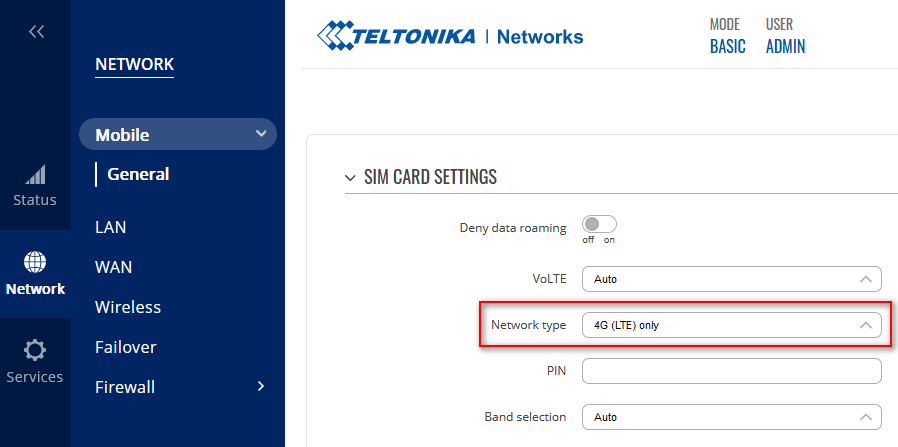
!! A 4G (LTE) connection is required to work properly with RealSender !!
You can setup it up inside Teltonika WebUI: Network > Mobile > SIM card settings
Network type: 4G (LTE) only
Option 2 - using LAN GATEWAY DATA
You can set the internet gateway to go through your LAN.
Teltonika WebUI: Network > LAN > NETWORK INTERFACES > [edit]
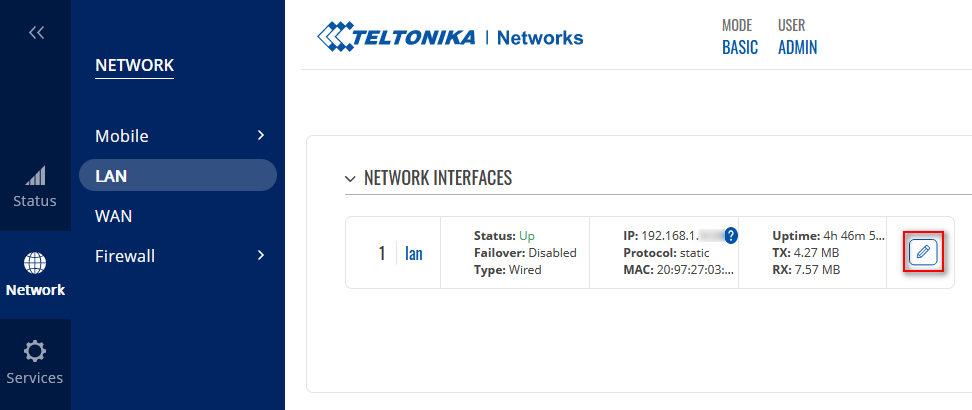
Just configure the IPv4 gateway and the DNS servers
see the example below (modify it with your own parameters):
INTERFACES: LAN
...
IPv4 gateway: 192.168.1.1
DNS servers:  8.8.8.8     !! mandatory !!
The Mobile Data Connection can be disabled in a few ways, see: Disable Mobile Data.
When mobile data is disabled, SMS messaging remains operational.
The easiest way to Disable Mobile Data, is to TEXT to the mobile number: <router_password> mobileoff
You can check the changes in the same way, using the “status” command: <router_password> status
Example of email message received
Subject: Text-Message (+41790000000)

Below is the received text message.  It was submitted by
 (+41790000000) on Monday, June 26, 2023 at 08:31:29 CEST
---------------------------------------------------------------------------

Test Message

---------------------------------------------------------------------------

Receiving clear and structured information via the internet can be complicated.
It needs a user interface to fill in and a server application that sends the data.
RealSender’s “form builder” lets you create simple and responsive forms,
therefore usable also on tablets and smartphones with small screens,
that will send the data directly to your email address.
Few “Drag & Drop” components will help you structure your questions:
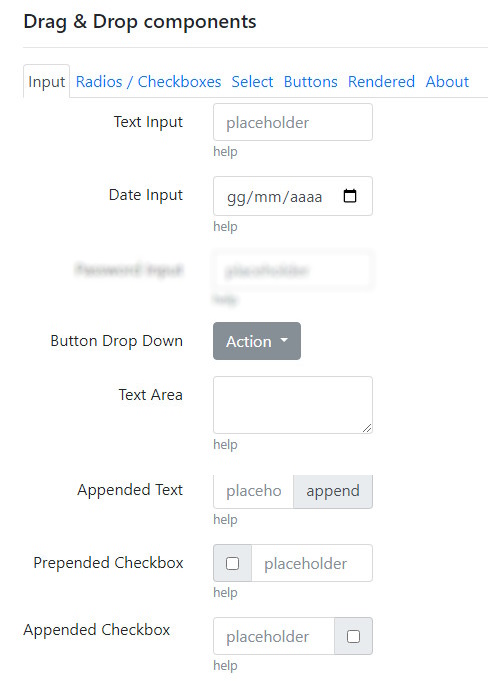
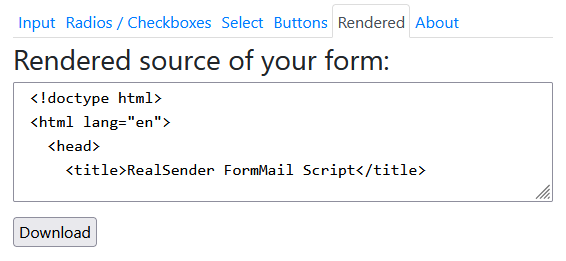
The source is downloadable in a ready-to-use “form.html” file:
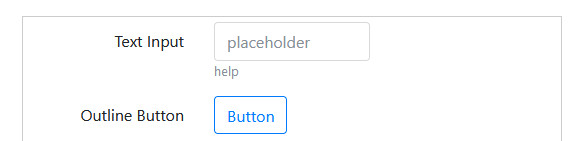
- add a “Text Input” field and a “Button” (in the “Buttons” tab), that will let you submit the form
- click the “Download” button (in the “Rendered” tab) to save the file locally
- open form.html, enter some text and press the button to submit the contents
(NOTE: because it’s not published online, the “Thank You” page will be coarse)
The message is received in the RealSender’s “temporary email” service: inxbox.realsender.com
NOTE: in the form.html file, three parameters can be changed:
- recipient = the code associated with the recipient's email
  to prevent abuse, the email address is pre-encoded in the sending script
  leaving "0" the message is received in the RealSender's "temporary email"
- email = the email address of the person filling out the form (ID=email)
  it is only used if there is NO "email" field in the form
- subject = the subject of the email message email
Request a free trial if you want to publish the html file online.
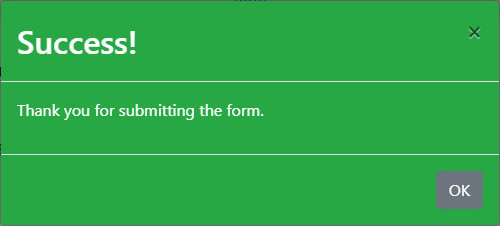
You will thus get an elegant confirmation popup like the one below.
The entered data will be delivered directly to your email box.
Request a free trial
sending via link builder

A simple link to insert in the email allows you
to receive immediate feedback from the recipient
Some examples
for more information on this month's promotion, click here:
https://click.youremaildomain.com/s/flash.pl?promo=yes
if you wish to participate in the event, click here:
https://click.youremaildomain.com/s/flash.pl?event=yes
to order the new product, click here:
https://click.youremaildomain.com/s/flash.pl?newproduct=yes
If you add the email address at the end of the link, as indicated below,
the reply-to will be inserted, the response will go to the email of the person who clicked:
To set the “landing page” displayed after sending the data,
add the “rdir” parameter to the end of the link, as shown below:
Alternatively indicate your website address, for example:
&rdir=www.example.com/thankyou
Setup
To prevent the links included in your communications
from being considered as a “phishing attempt”,
a subdomain of the sending domain must be configured, for example:
click.youremaildomain.com CNAME click.realsender.com
The notification recipient, even more than one, is set in the script.
You will let us know it during the configuration phase.
Webmail
In the examples above, notifications reach
our temporary email, which can be found at:
https://inxbox.realsender.com/monitor
Request a free trial
usercode key manager

A “usercode” is an alpha/numeric code that the user enters when logging on to a protected system.
The RealSender “usercode key manager” automatically generates a unique user code every hour,
which is sent upon request to the associated email address.
Only pre-authorized email addresses can request the user code.
The length and complexity of the user code is agreed upon during system configuration.
For example, this is the content of the email message that sends the user code:
Your user code is: 665407

!! the user code expires every hour at:03
Integrating with your secure system is simple:
- we configure the IP address authorized to retrieve the user code
- you set up a cronjob* that automatically updates the password based on the retrieved user code
(the update must be performed for each user authorized to access the system)
* = a time-based task scheduler, used to automatically run commands at specific intervals
To increase security, we recommend enabling “fail2ban” protection,
which blocks visitors after a certain number of unsuccessful login attempts.
You can see it in action by activating a RealSender trial account.
Along with the data for sending emails, you will receive instructions for accessing your user area.
For example, this is the content of the email message containing instructions
for accessing the RealSender user area and web space:
your user area access link:
https://username:usercode@rsXXX.realsender.com/reserved.area/

your web space access link:
https://username:usercode@rsXXX.realsender.com/view/

!! access links expire every hour at :03
In this case, the usercode is used in a web-based access system protected by “basic auth”.
Both the “username” and “usercode” parameters are automatically filled in,
ensuring the user a simple and immediate access experience.
If your system does not support automatic login,
you can simply transmit the user code within the email message
as a PIN or access code to be entered manually by the user, for example:
your secure example link
https://secure.example.com - access code: 000000
Request a free trial
emailcomposer app

The RealSender “emailcomposer” app is an open-source, flow-based visual development tool
based on Node-RED v5, which was originally developed by IBM.
It is used to generate email messages from connect hardware devices, APIs, and online services.
It provides a web browser-based editor where you can drag and drop customizable pre-built items
and wire together the block elements -called nodes- to build automated applications.
The app comes with some flows designed for specific tasks like:
Customers can modify the flows themselves or develop their own independently,
easily sending emails via the integrated RealSender service.
The system offered is hosted on dedicated virtual servers (one for each customer),
in a constantly updated, secure, and reliable environment.
Services are constantly monitored and automatically restarted when necessary.
Request a free trial
Subsections of emailcomposer app
google news alerts

Google News is a news aggregator service developed and maintained by Google.
It presents a continuous flow of links to articles organized from thousands of publishers and magazines.
The service is offered in over 60 countries and in more than 35 languages.
The Google News website automatically generates a list of news items
from major online newspapers (in the country where it is located)
and groups them by similar content, sorting them by topic and article publication date.
News items are always published as short summaries.
The “Google News alerts” flow for the emailcomposer app,
extracts the RSS feed and sends email notifications
at the desired interval, on a specific topic, to the associated recipient:

Simply duplicate the flow, edit the first and last node, and you will have
multiple alerts, for different topics, sent to multiple recipients.
If there are no news in the last 24 hours, no message will be sent.
The button to the left of “first topic” allows you to manually force execution.
Request a free trial
smtp status check

The SMTP status check verifies the availability, security, and functionality of your mail server.
It ensures the server accepts TCP connections, authenticates properly, and processes emails.
The check is configured to run at regular intervals, every ten minutes.
The user can change the predefined interval himself.
The “smtp status check” flow for the emailcomposer app
verifies that the SMTP service is working properly by sending real messages;
only in case of malfunction, the system sends an alert email:
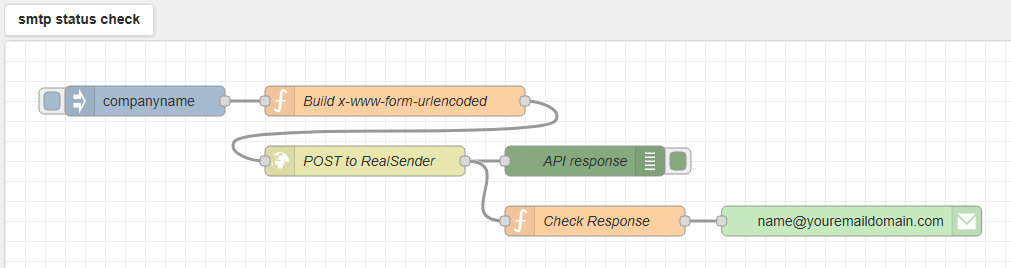
Simply duplicate the flow, edit the first and last node, and you will have
multiple alerts, for different smtp servers, sent to the desired recipients.
The user and password are set at system level as “environmen variables”, the user cannot read them.
The button to the left of the first “companyname” node allows you to manually force execution
and see the result in the debug area, on the right side of the screen:

Request a free trial
website status check

The website status check verifies the availability, SSL security, and functionality of your website.
It monitors the operation of your web server, the validity of SSL certificates and the answer of the web page.
The check is configured to run at regular intervals, every ten minutes.
The user can change the predefined interval himself.
The “website status check” flow for the emailcomposer app
sends an HTTP request to the site’s address and analyzes the response;
only in case of malfunction, the system sends an alert email:
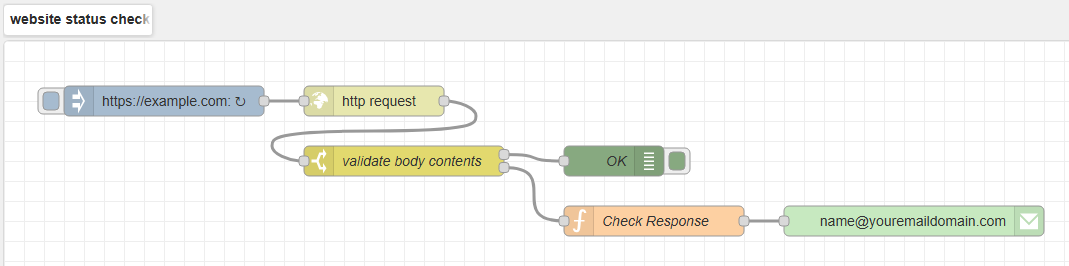
Simply duplicate the flow, edit the first and last node, and you will have
multiple alerts, for different websites, sent to the desired recipients.
The button to the left of the first https://example.com node allows you to manually force execution
and see the result in the debug area, on the right side of the screen:

Request a free trial
reverseproxy app

The email proxy server allows you to:
- improve the security, performance, and scalability of your smtp server
- connect to certified email providers without any hassle
- simplify email communications with a single line
- send notifications to the ntfy app (available for Android and iPhone)
- communicate with recipients whose mobile numbers are known only
Main Features:
improves the security, performance, and scalability of your smtp server
instantly connect your entire IT infrastructure to certified email providers
squeeze your email messages into a single line, convert email attachments into links
send notifications to the ntfy app, available on Android and iPhone systems
send email messages to the mobile world, receive text messages in your email and reply to text messages from your email
Subsections of reverseproxy app
reverse proxy for smtp servers
A reverse proxy is a server that sits in front of one or more web servers
to handle client requests, improving security, performance, and scalability.
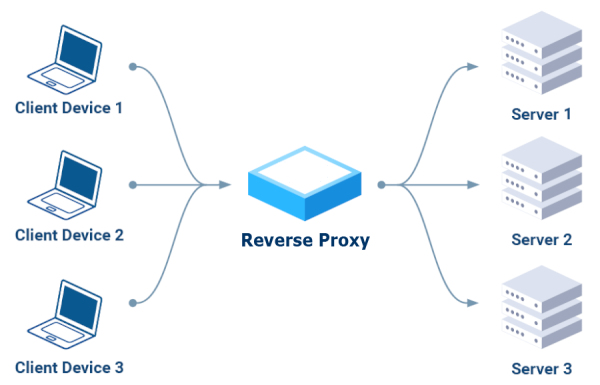
Instead of communicating directly with servers,
clients send their requests to the reverse proxy,
which routes them to the appropriate servers
acting as a single, secure access point.
Key Benefits:
- Security
It can block malicious requests, encrypt traffic,
and protect backend servers from direct attacks.
- Performance
It distributes incoming traffic across multiple servers, preventing overload
of a single server and ensuring greater availability.
- Scalability
It allows you to add or remove backend servers without service interruption,
offering the ability to handle growing traffic.
Request a free trial
certified email gateway

Certified Electronic Mail is an email capable of certifying the sending and delivery of a message and providing receipts that can be used against third parties.
There are three operating modes, which can also be combined, to enable sending email messages via certified email:
- recipients with predefined domain extensions (e.g., pec.it, legalmail.it, pec.poste.it)
- destination email addresses with the “.xx” extension (e.g., domainname.com.xx),
the “.xx” extension is then automatically removed
- certain specific senders (e.g., invoices@…)
These email messages are transmitted to another server that authenticates itself with the customer’s certified email SMTP service (such as Aruba, Legalmail, Register, to name a few).
The sender is automatically changed to the customer’s certified email address.
Bounced messages (e.g., user unknown/mailbox full) will be sent to the certified email address indicated as the sender.
Incorrect or no longer valid email addresses must be manually corrected or deleted to prevent further sending, as they could trigger spam protection in the recipient email inboxes.
Request a free trial
single-line text emails

The “plainmail” app reduces your emails to a single line of text,
it makes email attachments disappear, sending links instead:
Squeeze your emails
Simply add “.plain” to the recipients’ email domain,
they will receive only the subject:
Recipient: email@example.com.plain
Subject:   your short message, emoticons are allowed
Additional email content and attachments are ignored,
in their place, the following message will appear:
< PlainMail >
All content except the subject line has been removed.
» back to top
Convert email attachments into links
Just write “[A]” in the subject and add an attachment to the email.
The “plainmail” app will automatically convert it into a link.
The domain in the link can be any dedicated domain or subdomain you wish to use.
The file will be DELETED after six months.
» back to top
Request a free trial
notifications to the ntfy app

What is ntfy?
ntfy (pronounced “notify”) works as a “publish-subscribe” notification service,
in which you send a message to a “topic.” A smartphone or computer running the ntfy app
and subscribed to the same topic receives the message as a real-time push notification.
This allows for the delivery of instant alerts generated by scripts, servers, or any other service,
allowing users to receive notifications without complex configuration.
How it works with RealSender:
-
Publishers:
you can publish messages on a topic via email by sending an email to a specific address.
For example, you can publish a message by sending an email to topic@ntfy.youremaildomain.com.
The message content matches the email subject.
Only RealSender users are authorized to send emails to this address
-
Subscribers:
they receive notifications via their smartphone or computer,
with the ntfy app installed and the topic they’ve subscribed to
-
Topics:
think of topics as channels, with unique names and streams of events that are published within them.
You don’t need to explicitly create topics; just choose a name and use it.
Topic names are public, so it’s wise to choose something that cannot be guessed easily
After the email is sent, the ntfy server receives the message and stores it for that topic’s subscribers.
A subscriber (via the ntfy app) is connected to the topic and receives the message in real time.
It’s a “decoupled system”, publishers don’t need to know their subscribers, and vice versa.
This simplifies its use and management, both for the publisher and the subscriber.
» back to top
Convert email attachments into links
Just write “[A]” in the subject and add an attachment to the email.
The “plainmail” app will automatically convert it into a link.
The domain in the link can be any dedicated domain or subdomain you wish to use.
The file will be DELETED after six months.
» back to top
Request a free trial
messages to mobile numbers

Connect your emails to the mobile world,
maximize your business communication opportunities,
without changing your work habits:
Send text messages from your email
Push notifications are the most effective way to reach your customers quickly.
With super high open rates (up to 95%) and top response rates (up to 45%).
– source: Gartner study on Text Messages, year 2019
Recipient: mobilenumber@text.yourdomain.com
Subject:   the text message content, emoticons are allowed

(additional email content and attachments are ignored)
We will provide you with an industrial router pre-configured for your mobile operator.
Control over the sending and delivery of text messages must be carried out via the operator used.
Our system checks every ten minutes that the router is responding (check power and internet connection).
To avoid abuses, messages must be sent via RealSender, using pre-authorized senders,
with the SPF and DKIM “strict” alignment. Learn more on email authentication - advanced.
» back to top
Receive text messages in your email
The text message replies will be delivered directly to your preferred mailbox,
with an email message like this:
Subject: Text-Message (+41790000000)

Below is the received text message.  It was submitted by
 (+41790000000) on Monday, July 29, 2025 at 10:57:00 CEST
---------------------------------------------------------------------------

Test Message

---------------------------------------------------------------------------
» back to top
Reply to text messages from your email
RealSender’s “plainmail” app lets you send text messages directly from your EMAIL.
So you can reply from your favorite email application.
The recipient address is already filled with the original sender number:
Recipient: mobilenumber@text.yourdomain.com
Subject:   the content of the reply

(additional email content and attachments are ignored)
The conversation between email application and mobile device can thus continue.
» back to top
Convert email attachments into links
Just write “[A]” in the subject and add an attachment to the email.
The “plainmail” app will automatically convert it into a link.
The domain in the link can be any dedicated domain or subdomain you wish to use.
The file will be automatically DELETED after six months.
» back to top
Request a free trial